Emojis can be a quick and fun way to add some flavor to your copy, but there are some things to be aware of when including them. In this article, we’ll go over some best practices and things to keep in mind when adding emojis to your emails.
Email Client Emoji Support
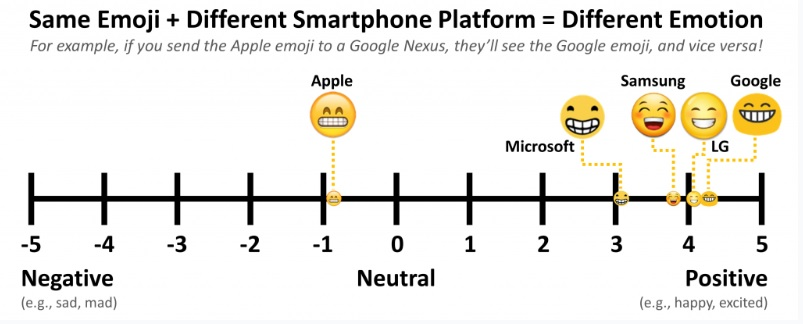
Major email clients and mailbox providers do support emojis…but not the way you think. Some don’t support every single emoji that’s out there, and emojis will look different based on the different devices, email clients, and operating systems. For example, Windows 7 and earlier won’t show emojis, but Gmail always will. And brand new emojis take time to be picked up by different email clients.
Accessibility
For the visually impaired that are reliant on screen readers, emojis can still be read aloud to them but are done as so:
😎 “Smiling face with sunglasses”
🤓 “Nerdy face with thick horn-rimmed glasses and buck teeth”
🙄 “Face with rolling eyes”
When used excessively it can get annoying and distracting from what you are trying to convey, especially when used in the middle of sentences.
Same Emoji Different meaning
Be sure to test your emojis on different devices and operating systems due to the fact the same emoji could be interpreted differently depending on how it is rendered.
Suggested Emoji usage
If you are going to use emojis in your email header, we recommended 2 maximum. One at the beginning and one at the end so any screen reader does not interrupt what you are trying to say. For the body of the paragraph we recommending matching your audience, if you are marketing to a younger crowd you’re able to use more emojis compared to an older crowd.